
Apple Digital Masters: Reality vs Lore
Apple Digital Masters (ADM) still has a bit of mystique in the music world — equal parts marketing term and misunderstood tech spec. The myths are loud: It’s just branding. It makes your tracks louder. It changes the EQ. The reality is more mundane — and more important if you care about translation and preserving your work.
Here’s what ADM really is, what it isn’t, and how to prepare your music without sabotaging the mix in the process.
What ADMs Actually Change
Apple Digital Masters is essentially Apple’s successor to “Mastered for iTunes,” updated for their current streaming ecosystem. The program certifies that your masters meet certain technical guidelines so they translate cleanly through Apple’s AAC encoding.
When you upload an ADM-certified master to Apple Music:
It’s encoded directly from your 24-bit source, using Apple’s proprietary tools.
There’s no intermediate CD-quality (16-bit/44.1 kHz) conversion step.
The AAC encoder works with more headroom and resolution, which means fewer pre-echoes, less aliasing, and better preservation of transients.
What it doesn’t do:
It doesn’t apply EQ, compression, or “sweetening” behind your back.
It doesn’t make your mix louder. Apple Music uses Sound Check/loudness normalization, so over-limiting can backfire.
It doesn’t guarantee better sound if your source is flawed — it only preserves what’s there.
The takeaway: ADM is about fidelity through the encoding stage, not creative enhancement.
Source Format Hygiene
ADM delivery lives or dies on source integrity. The spec is simple but non-negotiable:
Format: 24-bit WAV or AIFF, original mix sample rate (no upsampling for show).
No Clipping: Inter-sample peaks are the big killer. A file that’s “0.0 dBFS” in your DAW can clip once encoded to AAC.
Lossless Path: Don’t print from a lossy source. Avoid MP3 references, YouTube rips, or anything that’s been through AAC/MP3 once already.
Final Print From Mix: Export directly from your DAW’s mix or mastering session — no conversions in random players, no bounce-to-MP3-and-back.
Think of it as archival practice: you’re delivering the definitive version of your work, uncorrupted, at full resolution.
Headroom Sanity
One of the biggest misunderstandings about ADM is the “-1 dBTP rule.” Yes, Apple’s own documentation recommends keeping true peaks below -1 dBFS to avoid clipping after encoding. But that doesn’t mean slam the limiter to -1 and call it a day.
Real-world best practice:
Aim for -1 dBTP or lower on true peak (measured with a reliable meter).
Loudness is still about the music. ADM tracks get normalized to around -16 LUFS in Apple Music, so going louder won’t make them play louder — just more crushed.
Leave the dynamics in. AAC encoding preserves transients well when they’re actually there to preserve.
The sweet spot: dynamic enough to breathe, controlled enough to survive conversion.
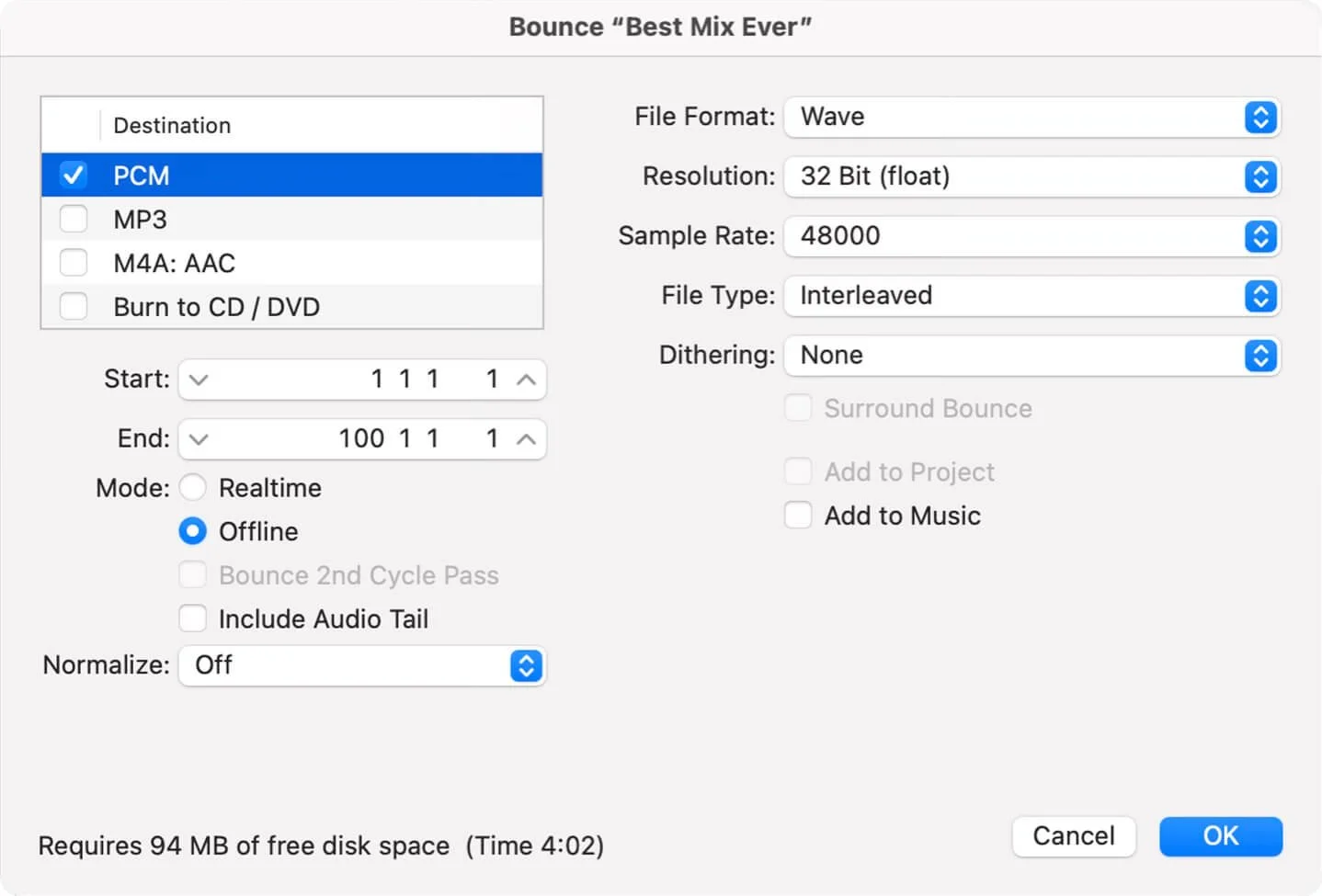
Ideal mix bounce settings (assuming the project sample rate is 48 kHz; it should always be native to the session)
Delivery Checklist
Before you send an ADM master off for distribution, run through this:
Export at Original Resolution — 24-bit / native mix sample rate.
Check True Peaks — Keep them ≤ -1 dBTP to avoid AAC overs.
No Clipping in the Print — Visually and by ear.
Clean Metadata — Correct titles, ISRCs, spelling.
Confirm Lossless Lineage — No lossy steps in the chain.
Once approved by a certified mastering engineer (or distributor working with one), your track will carry the Apple Digital Masters badge in Apple Music — a quiet indicator that you cared enough to deliver the best possible source.
Closing Thoughts

Apple Digital Masters is neither magic nor marketing fluff: it’s a straightforward quality standard designed to keep your work intact through Apple’s ecosystem.
Prep for it the way you’d prep for vinyl cutting or broadcast: by respecting the format’s quirks and limitations without bending your music out of shape. Source hygiene, headroom sanity, and a clean delivery path will do more for your sound than any badge ever could.
If you start with a great mix, finish with a great master, and hand it over unbroken, ADM will do exactly what it’s meant to: preserve the truth of the music you made.
If you’d like to know more, check out my services page.